FLEETVIEW 2.0

Weekly Sync #5

Batch 1 Release ยท Batch 2 Kickoff

July 30, 2026ยทBi-Weekly Syncยท45 min

TODAY'S AGENDA

Two Items

๐Ÿš€

Item 1 โ€” Batch 1 Production Release

Batch 1 goes live July 31. We need your help to test Smart Diagnostics with real production device data โ€” and we'll enable it for your specific accounts first.

๐Ÿ“‹

Item 2 โ€” Batch 2 Acceptance Criteria Review

Batch 2 AC is ready for review (34 requirements). Once reviewed and approved, we move into design and formally kick off Batch 2 development.

ITEM 1 โ€” BATCH 1

Going Live July 31 ๐ŸŽ‰

Smart Diagnostics enters production โ€” and we need your help to validate it with real data.

WHAT'S LAUNCHING

  • โœ“AI Smart Diagnostics โ€” enter SN to auto-diagnose faults
  • โœ“Structured fault conclusions in plain language (no code lookup)
  • โœ“TroubleShooting plans (Remote / On-Site / Escalation)
  • โœ“Diagnostic report generation
  • โœ“Read-only โ€” no device writes in Batch 1

ROLLOUT & FEEDBACK

  • โœ—Not open to external users โ€” installers, enterprise customers excluded for now
  • โ€ขInternal designated accounts only โ€” small-scale pilot
  • โ€ขTest with real production device data
  • ๐Ÿ‘Give feedback directly via thumbs up / thumbs down on the diagnostic result page
  • โ€ขWe monitor feedback in the backend and use it to improve the knowledge base

โšก We Need Your Support

Please let us know which accounts you'd like us to enable. Comment your FleetView login email in the ClickUp task below โ€” we'll collect all requests and work with the dev team to enable access.

๐Ÿ‘‰ Request Account Access

ITEM 1 โ€” BATCH 1

๐Ÿ‘ How to Submit Feedback

Two ways to share feedback โ€” we monitor all responses in the backend and use them to continuously improve the knowledge base.

Method โ‘ 

In-App Feedback

Step 1 โ€” Click ๐Ÿ‘ / ๐Ÿ‘Ž in the bottom-right of the diagnostic result
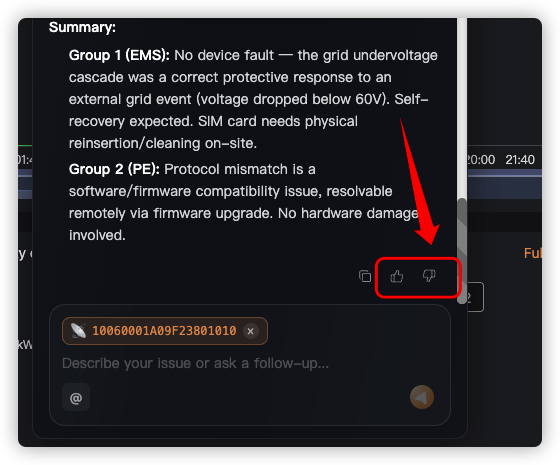
Thumbs up/down buttons

Step 2 โ€” Optionally describe the issue after clicking thumbs down
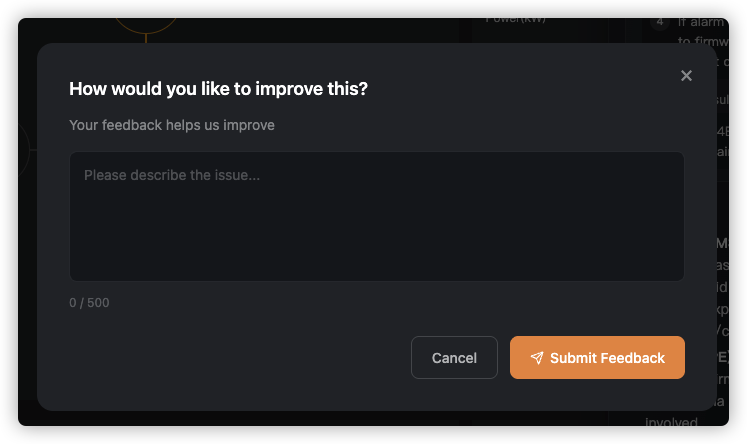
Feedback dialog
Method โ‘ก

ClickUp Comments

You can also leave a comment in the ClickUp task โ€” great for sharing screenshots or describing issues in detail. We'll reply directly in ClickUp.

  • โœ“ Supports text, screenshots, and file attachments
  • โœ“ Ideal for complex issues or sharing diagnostic screenshots
  • โœ“ We'll follow up directly in the ClickUp thread
๐Ÿ‘‰ Leave Feedback in ClickUp

ITEM 2 โ€” BATCH 2

Acceptance Criteria Ready

34 requirements across 3 modules โ€” same Layer 1 + Layer 2 format as Batch 1.

๐Ÿ”ง

One-Click Fix & Remote Ops

Remote fix commands ยท One-click fix ยท Battery recharge ยท Operation audit

4

requirements

๐Ÿ”

Permission System 2.0

Sub-account lifecycle ยท Button-level RBAC ยท Electrician / supervisor role templates

17

requirements

๐Ÿ“

Log Management

Log visualization ยท Code-to-English translation ยท Change history ยท NEM solar export

13

requirements

๐Ÿ“‹ Please Review

Leave comments directly in the ClickUp doc. Once reviewed and approved, we'll start the design phase and formally kick off Batch 2.

๐Ÿ‘‰ Batch 2 Acceptance Criteria โ€” All 34 Requirements (Layer 1 + Layer 2)

NEXT STEPS

Action Items

1

Tell us which accounts to enable for Batch 1

Owner: Service Team  ยท  Due: ASAP after July 31 launch

2

Review Batch 2 Acceptance Criteria and leave comments

Owner: US Service Team / Auston / Ronnie  ยท  Due: Before design kicks off

โ†’ Open Batch 2 AC Doc
3

Batch 2 design phase starts after AC approval

Owner: SZ Product Team  ยท  Target release: 2026-09-15

Questions or comments? Drop them in ClickUp: MVP Batch 2 or reply to the meeting summary email.

1 / 5